Youth basketball stats parents can capturecourtside.
Keep one trusted record of the athlete's games, minutes, shooting, rebounds, assists and defense—even when different leagues and tournaments use different systems.
Fast live entry Parent-controlled youth privacy Shareable athlete stories
REAL HOOPSTAMP SCREENOne athlete profile across rec league, school, club and tournament basketball
BUILT FOR REAL BASKETBALL
Youth Basketball Stat Tracker for Parents
Track your youth basketball player's live stats, minutes and shot chart. Build season totals, shareable cards, highlights and a public athlete profile.
01
Follow the same athlete across every basketball season
Youth athletes often play for a school team, travel club, recreation league and tournament program in the same year. HoopStamp keeps those games connected to one player profile instead of scattering the record across paper books, group texts and unrelated apps. Families can filter by game, review a season or see career totals.
One schedule across multiple teams and competitions
Per-game, season and career views
Minutes and on-court participation history
Individual and team-game statistics together
02
Capture the details behind the final score
A point total alone does not show how a player performed. HoopStamp records shooting attempts, exact court locations, rebounds, playmaking, defense, turnovers and fouls. The result is a fuller performance record that helps the athlete, family and coach see patterns from game to game.
Points with complete shooting splits
Offensive, defensive and total rebounds
Assists, steals, blocks, turnovers and fouls
Made and missed shot locations
03
Give the athlete a story they are proud to share
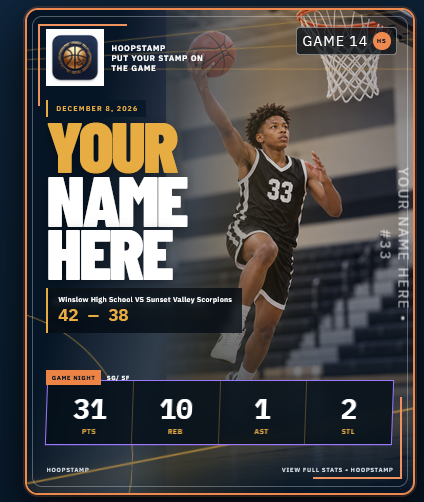
Each completed game can create a different trading-card style player graphic, a public stat page, a factual game recap and space for highlight clips. Public sharing is controlled by the account owner, paid access and parental consent rules. Coach verification marks which reported performances were reviewed.
Multiple athlete photos for player cards
Share links for Facebook, Instagram and TikTok
Public game recaps that link to the player
Coach-verified or clearly unverified status
Capture the action
Record the stats and shot locations that explain how the game was played.
Understand the performance
Review game, season and career totals in one connected basketball record.
Share the story
Turn verified results into player cards, profiles, box scores and recaps.
COMMON QUESTIONS
HoopStamp answers
Can my child use one HoopStamp profile for multiple teams?
Yes. The athlete can join more than one team, league or tournament, and accepted schedules are added to the existing HoopStamp calendar.
Can parents enter stats when the team is not tracking them?
Yes. If the league or tournament organizer does not provide official stat tracking, the player account can open the individual tracker and record stats for that athlete.
How does coach verification work?
After a game, HoopStamp can email an invited coach a secure review link. The coach can approve the reported statistics or request corrections. Until then, the game remains labeled unverified.
Are under-13 athletes allowed?
Yes, through a parent-managed enrollment flow. Verified parental consent is required before under-13 information is entered, and public sharing requires a separate parental choice.
Can recruiters view the player page?
A public, active and consented player profile can be viewed without a HoopStamp login and can include game-by-game stats, shot charts, recaps, highlights and social links.